---
title: Scheduling Time with Your IT Team | LayerCake Customer Resources
description: Introduction to our self scheduling tool - how to book time with your IT technician.
image: https://layercaketech.com/hubfs/Screenshot%202026-09-08%20at%201.52.06%20PM.png
---
[Skip to content](https://layercaketech.com/resources/knowledge-base/timezest-how-to-schedule-time#main-content)
[Homepage](https://layercaketech.com/?hsLang=en)
[Let's Talk](https://layercaketech.com/get-a-quote?hsLang=en)
[Let's Talk](https://layercaketech.com/get-a-quote?hsLang=en)
[Homepage](https://layercaketech.com/?hsLang=en)
[Get Support](https://layercaketech.com/support?hsLang=en)
[Get Support](https://layercaketech.com/support?hsLang=en)
// SELF SCHEDULING
# How to Schedule Time with Your IT Team
LayerCake uses a self-service scheduling tool that lets you pick a time to meet with your IT technician that works around your schedule; no back-and-forth calls or emails required.
## How self scheduling works
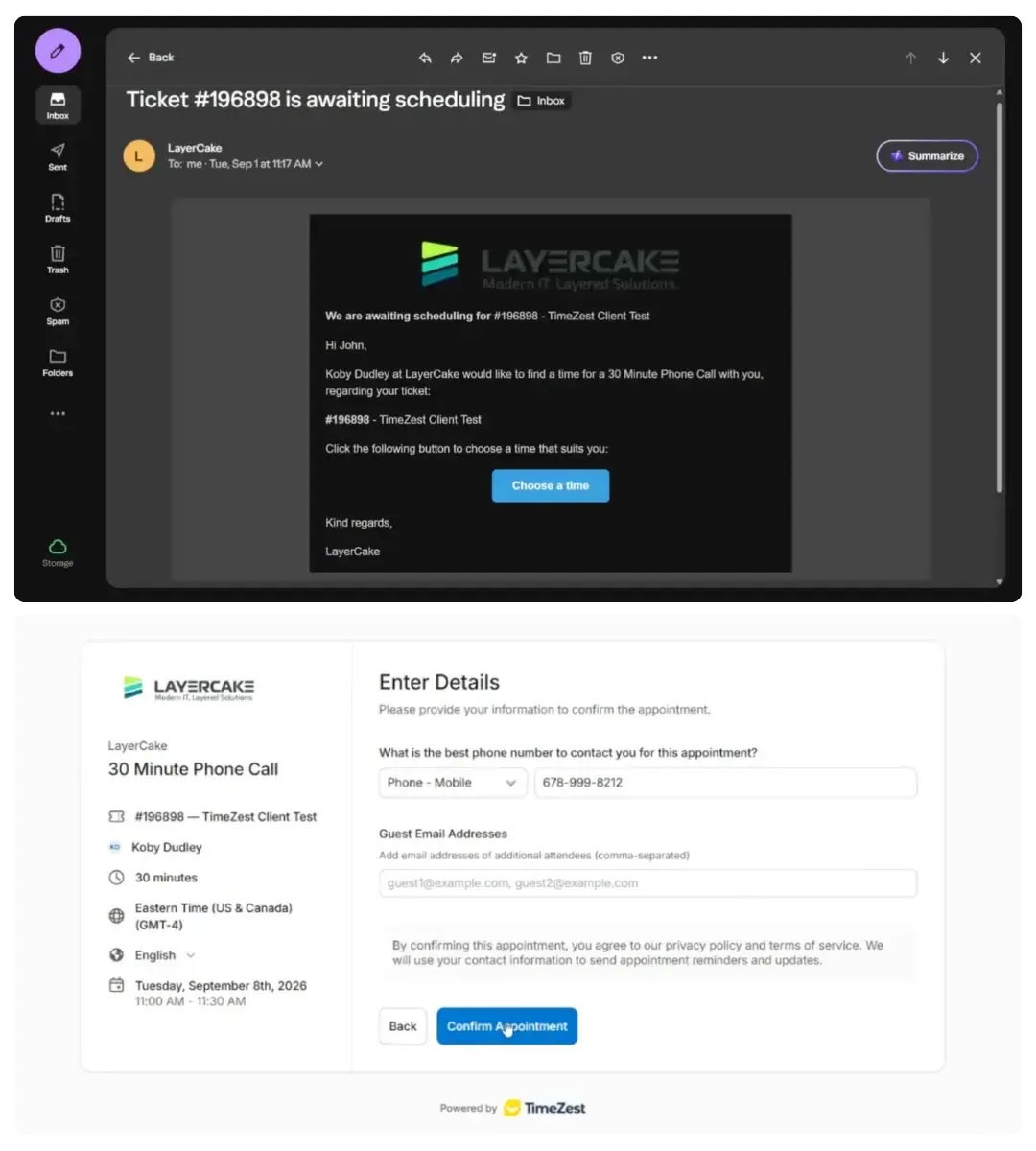
1. **Submit your ticket as usual.** Use whichever method you're used to: email, portal, or phone call.
2. **Receive or request a scheduling link.** If you already know you'd like to pick your own time rather than wait for a callback, just add a note to your ticket: *"Please send me a scheduling link."* Otherwise, our team will send a scheduling link automatically if they can't reach you about your ticket.
3. **Pick your time.** Select the slot that fits your schedule, confirm a good phone number to reach you at, and hit **Confirm**.
4. **Get your calendar invite.** As soon as you confirm, you'll receive a calendar invite for your selected time.
## Easy rescheduling and cancellation
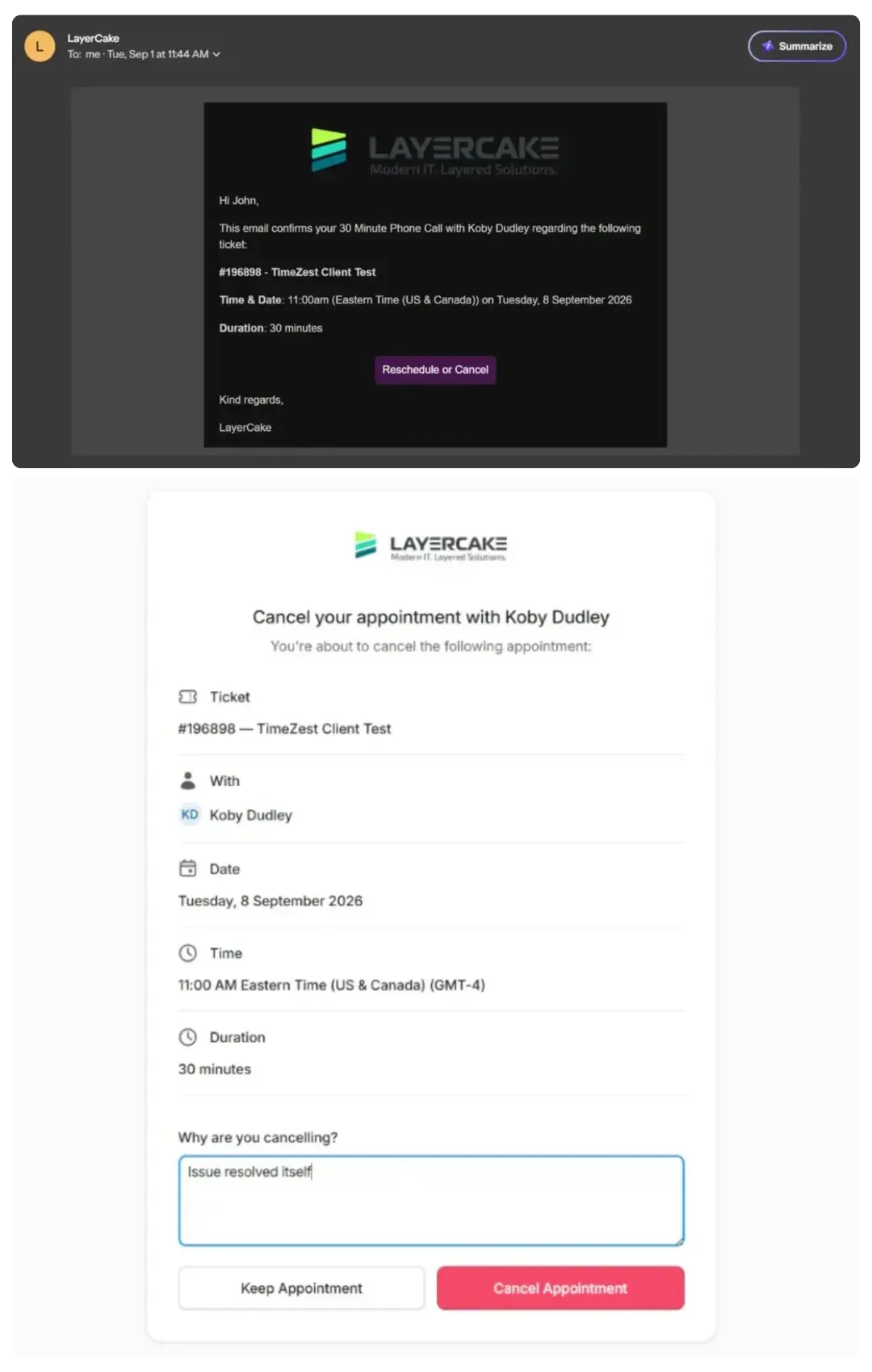
If something comes up, or you find a workaround and no longer need the appointment, you have control of your schedule. Your confirmation includes **Reschedule** and **Cancel** buttons, so you can make changes right up until your appointment:
- **Reschedule:** Takes you right back to the available time slots so you can pick a new one.
- **Cancel:** We'll ask why, so we can help appropriately:
- *"Availability changed":* Let us know if you need a couple weeks, and we can send a new scheduling link later, or temporarily close the ticket and reopen it when you're ready.
- *"Issue resolved itself":* We'll close the ticket so you're not bothered with unnecessary follow-ups.
- **Keep Appointment:** Brings you right back to your original confirmation.
## Why it's a win for you:
### No More Phone Tag
Choose a time that works instead of hoping your tech catches you when you're free.
### Know Who You're Meeting
The calendar shows you who you're booking time with: either a specific technician, or a member of your dedicated "pod."
### Time Zone Conversion
Update your time zone as needed, and available meeting time slots will convert to your local time.
### Friendly Reminders
If a scheduling request goes unanswered, you'll get two reminder notices. If there's still no response, we'll follow up directly.
### Set It and Forget It
Once you confirm, it's on your calendar. No need to track down support or keep track of meetings manually.
### Total Flexibility
Reschedule or cancel in a click whenever your day changes, without having to track someone down.
### Ready to try it?
Next time you submit a ticket, **just ask for a scheduling link**.
Watch the [walkthrough video above](https://layercaketech.com/resources/knowledge-base/timezest#) for a look at the full experience.
[RETURN TO SUPPORT HUB](https://layercaketech.com/support?hsLang=en)
[](https://layercaketech.com/?hsLang=en)
[](https://layercaketech.com/?hsLang=en)
MANAGED IT
CYBERSECURITY
IT CONSULTING
- Home
- Products
- Pricing
- Blog
- Company
[Privacy Policy](https://layercaketech.com/privacy-policy?hsLang=en) © 2026 LayerCake Technologies. All rights reserved.
```json
{
"@context" : "https://schema.org",
"@type" : "VideoObject",
"contentUrl" : "https://51022813.fs1.hubspotusercontent-na1.net/hubfs/51022813/video_assets/221518119694/inherited/web_optimized.mp4",
"dateModified" : "2026-09-09T21:45:49.922Z",
"duration" : "PT3M46S",
"height" : 1080,
"name" : "Time Scheduling Demo with Koby",
"thumbnailUrl" : "https://layercaketech.com/hubfs/Videos/Time%20Scheduling%20Demo%20with%20Koby.mp4/medium.jpg",
"uploadDate" : "2026-09-09T21:45:49.919Z",
"width" : 1920
}
```
```json
{
"@context" : "https://schema.org",
"@id" : "https://layercaketech.com/#organization",
"@type" : "ProfessionalService",
"address" : {
"@type" : "PostalAddress",
"addressCountry" : "US",
"addressLocality" : "Cincinnati",
"addressRegion" : "OH",
"postalCode" : "45236",
"streetAddress" : "8044 Montgomery Rd Ste. 510"
},
"name" : "LayerCake Technologies",
"telephone" : "(513) 549-5031",
"url" : "https://layercaketech.com"
}
```
```json
{
"@context" : "https://schema.org",
"@id" : "https://layercaketech.com/resources/knowledge-base/timezest#document",
"@type" : "DigitalDocument",
"description" : "Learn how to schedule time with your IT technicians by using Timezest.",
"encodingFormat" : "application/pdf",
"genre" : "Tutorial",
"image" : "",
"isAccessibleForFree" : false,
"isPartOf" : {
"@id" : "https://layercaketech.com/resources/#webpage"
},
"name" : "Timezest Tutorial for LayerCake Customers",
"publisher" : {
"@id" : "https://layercaketech.com/#organization",
"@type" : "ProfessionalService",
"name" : "LayerCake Technologies"
},
"url" : "https://layercaketech.com/resources/knowledge-base/timezest"
}
```